School Admission & Student Information System

Admissions & student information system: every record, one search away

Only students and teachers on your school’s official list can register, so no outsider gets in. Add one at a time or import a whole class from Excel in one go.

Type every student once. Use them everywhere.

  • 1 CSV fileimports a whole class
  • 2parent contacts on every student
  • Classes 1–12with sections A to D
Admissions & Student Records in the EduMaxim app: A whole class imported from one file. Sample data.

Sound familiar?

One student, typed into five different registers

A new student joins. The office writes the name in the admission register, then the class register, then the fee book, then the bus list. A parent changes their number and only one of those gets updated. A month later, nobody is sure which list is right.

What it quietly costs your school

  • Hours spent copying the same names again and again
  • Wrong phone numbers when you most need to reach a parent
  • Logins handed out on paper slips that get lost
A student information system keeps one record per student, and every other module uses it.

Why schools use it

What Admissions & Student Records does for your school

  • One official list

    Your admissions list, with roll numbers and your school code, is the single source of truth.

  • No outsiders

    Only people on your official list can register, so no stranger ever gets a login.

  • Nothing typed twice

    A student added here appears in attendance, fees, exams, homework and transport automatically.

Before and after

What changes

Before

How it usually goes

  • Student lists typed again in every register
  • Logins handed out on slips of paper
  • Parent phone numbers scattered across files
With EduMaxim

How it goes now

  • One official list with roll numbers and a school code
  • A whole class imported from one CSV file
  • Both parents’ numbers on every student’s record

Three steps

How the student database software works

  1. Step 1 of 3

    Send your student list

    Import a whole class from one CSV file, or add students one at a time.

  2. Step 2 of 3

    Logins are created

    Students, teachers and accountants register against your official list and school code.

  3. Step 3 of 3

    One record, used everywhere

    The same student record flows into attendance, fees, exams and transport.

See it in the app

Admissions & Student Records on your phone

Real screens from the EduMaxim app, shown with a sample school. Your school sees its own classes, students and fees.

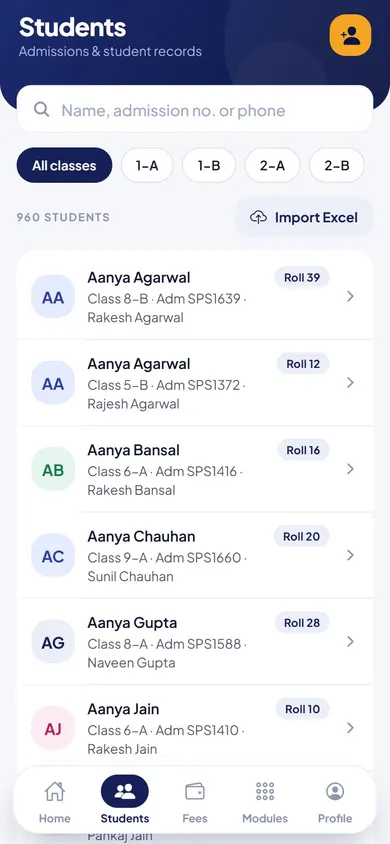
  • EduMaxim student database software, Office screen: Every student, searchable by name, admission number or phone
    OfficeEvery student, searchable by name, admission number or phone
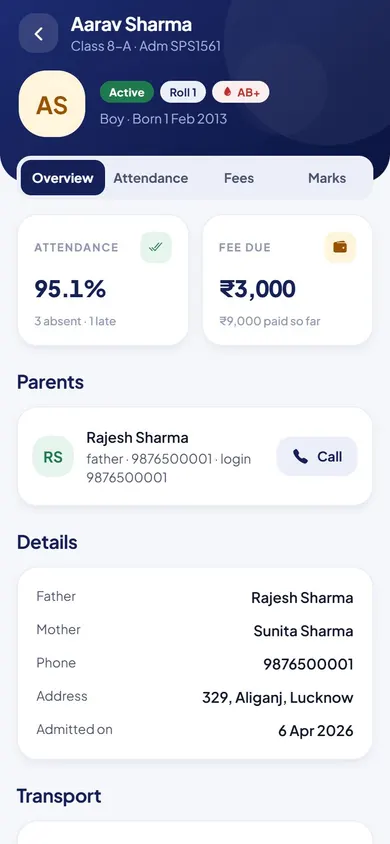
  • EduMaxim student database software, Office screen: One record per student: attendance, fees, marks and both parents
    OfficeOne record per student: attendance, fees, marks and both parents
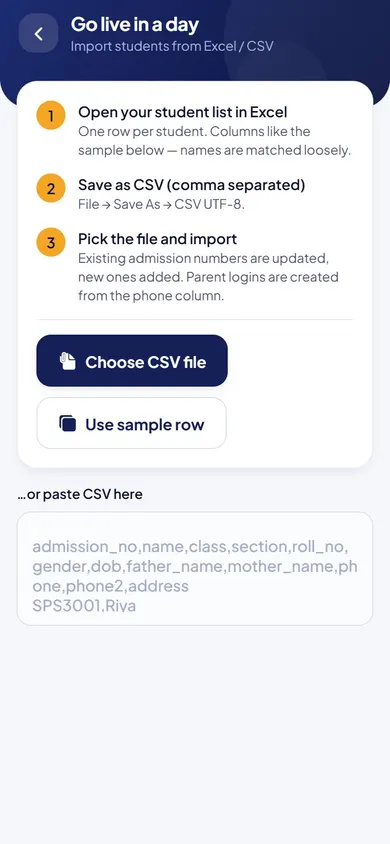
  • EduMaxim student database software, Office screen: A whole class brought in from Excel or CSV
    OfficeA whole class brought in from Excel or CSV

Everything included

Student record management features

Schools also call this a student management system, student information management software or a student database.

  • Official admissions list with your school code
  • Bulk import of a whole class from CSV
  • Logins for students, teachers and accountants
  • Classes 1 to 12 with sections A to D
  • Two parent contacts for every student
  • Registered and pending status for each entry

Buying guide

What to look for in a student information system

Comparing options? These five things decide whether your staff still use it after the first month. Here is how EduMaxim handles each one.

  1. One record per student

    Class, section, roll number and both parents’ contacts in one place, used by every module.

  2. Fast bulk import

    Bring in a whole class from one CSV file instead of typing each name.

  3. Only your school can register

    Students and staff register only if they are on your official list with your school code.

  4. Logins for everyone

    Students, teachers and accountants each get their own login and screens.

  5. Clear status

    See who has registered and who is still pending, at a glance.

Who it helps

Made for everyone who uses it

  • Director

    Decides who is on the official list and who can sign in.

  • Front office

    Imports whole classes from Excel and keeps parents’ numbers up to date.

  • Teachers & students

    Register with their own login against your school’s list.

Guides

Read more about admissions & student information system

Questions about Admissions & Student Records

Can we import students from Excel?

Yes. Save your list as CSV and import a whole class at once. After your demo we send Excel setup templates that show the exact columns.

Can an outsider register in our school?

No. Only people on your school’s official admissions list, with your school code, can register.

Does it work as a student information system?

Yes. Each student has one record with class, section, roll number and both parents’ contacts, and every other module uses it.

Can we keep our student list in Excel and bring it in?

Yes. Fill in the student list Excel template we send you after your demo, and we import it for you during setup.

Do students and teachers get their own login?

Yes. Students, teachers and accountants each get their own login and screens. Parents follow their child in the student app.

Is our student database safe?

Only people on your school’s official list, with your school code, can register. Each person sees only what their role needs, and an audit log records every action.

Book a free demo