Student Progress Tracking & Achievement Portfolio

Student progress tracking: spot who needs a push, and plan it

Clear goals, thoughtful support and progress worth celebrating. Teachers set a goal, agree the practice and review it on a date. Achievements beyond marks are recorded and verified.

No child who needs help is forgotten.

  • Goal + datein every support plan
  • Overduereviews flagged
  • Teacher-verifiedachievement portfolio
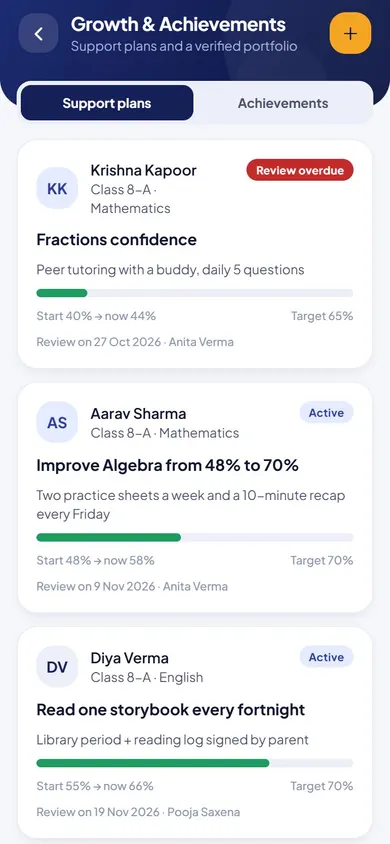
Growth & Achievements in the EduMaxim app: Overdue reviews stand out. Sample data.

Sound familiar?

The child who needs help shouldn’t depend on who remembers

A teacher notices a child struggling and promises extra help. Then the term gets busy. Nobody writes down what was tried or whether it worked, and by the next exam the same child is still behind. Their best moments, a prize or a project, are forgotten by year end too.

What it quietly costs your school

  • Struggling students who slip through the gaps
  • No proof that extra help actually worked
  • Achievements lost when the year ends

Student progress tracking gives every child a plan, a review date and a record of their best work.

Why schools use it

What Growth & Achievements does for your school

  • A plan for every child who needs a push

    Set a goal, an action and a review date, with starting and review scores.

  • Reviews that don’t slip

    Active, overdue, completed and paused plans are listed, so overdue reviews stand out.

  • A portfolio parents trust

    Learning, creativity and leadership achievements, each verified by a teacher, in a printable summary.

Before and after

What changes

Before

How it usually goes

  • Help for struggling students depends on who remembers
  • Projects and achievements lost once the year ends
  • No record of whether extra help actually worked
With EduMaxim

How it goes now

  • A support plan with a goal, an action and a review date
  • Overdue reviews shown so no child is forgotten
  • A teacher-verified achievement portfolio for every student

Three steps

How student performance analysis works

  1. Step 1 of 3

    Start a support plan

    Set a goal, an action, a starting score and a review date for a child who needs help.

  2. Step 2 of 3

    Review on time

    Overdue reviews are flagged, so no child is forgotten.

  3. Step 3 of 3

    Record achievements

    Learning, creativity and leadership achievements go into a printable portfolio.

See it in the app

Growth & Achievements on your phone

Real screens from the EduMaxim app, shown with a sample school. Your school sees its own classes, students and fees.

  • EduMaxim student progress tracking, Teacher & director screen: Support plans with a goal, progress and a review date
    Teacher & directorSupport plans with a goal, progress and a review date
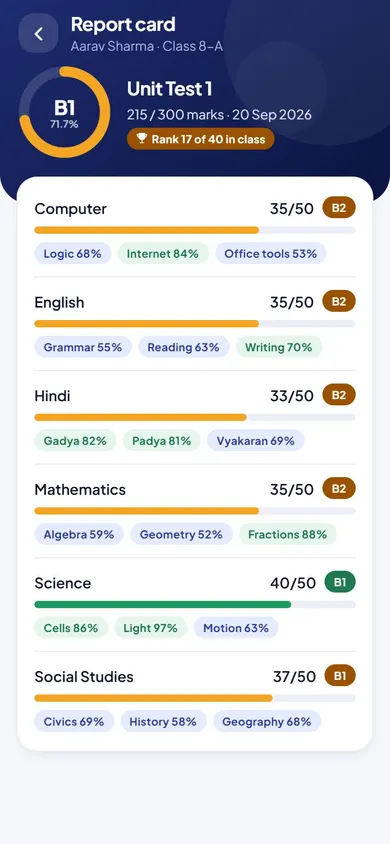
  • EduMaxim student progress tracking, Teacher screen: Topic-wise scores that show where a child needs help
    TeacherTopic-wise scores that show where a child needs help

Everything included

Remedial plan and student portfolio features

Schools also search for this as student performance tracking or learning gap analysis.

  • Learning support plans with starting and review scores
  • Active, overdue, completed and paused plans
  • Achievement portfolio: learning, creativity, leadership
  • Every achievement verified by a teacher
  • Printable portfolio summary for students
  • School-wide view for the director

Buying guide

What to look for in student progress tracking

Comparing options? These five things decide whether your staff still use it after the first month. Here is how EduMaxim handles each one.

  1. A real plan for each child

    Set a goal, the support and a review date, with a starting and a review score.

  2. No child forgotten

    Overdue reviews are shown, so plans don’t quietly stop.

  3. Achievements beyond marks

    Learning, creativity and leadership in a portfolio, each verified by a teacher.

  4. Something to show parents

    Students can print a summary of their portfolio.

  5. The whole school at a glance

    The principal sees active, overdue, completed and paused plans across the school.

Who it helps

Made for everyone who uses it

  • Teachers

    Create and review support plans, and verify achievements.

  • Director

    A school-wide view of every plan and its review date.

  • Students & parents

    A printable portfolio of verified achievements.

Guides

Read more about student progress tracking

Questions about Growth & Achievements

Can parents trust the achievement portfolio?

Yes. Every achievement is verified by a teacher before it appears in the student’s portfolio.

Can the principal see every support plan?

Yes. The director has a school-wide view of active, overdue, completed and paused plans.

How does it find learning gaps?

Topic-wise marks and checked homework show each student’s weak topics, so teachers can plan support before the exam, not after it.

How do we track a student’s progress over the year?

Each support plan records a starting score, a target and review dates, and progress is shown against the target. Achievements are kept in a teacher-verified portfolio.

What is a remedial plan in EduMaxim?

A support plan: a goal, the support to give (such as practice sheets twice a week), a review date, and starting and target scores. Overdue reviews are shown, so no plan quietly stops.

Book a free demo