Student Attendance Management System with SMS

Student attendance app: one tap per class, parents told instantly

Attendance should take a few taps, not a period. Teachers mark each student present, absent or late, or the whole class in one tap, and parents are told automatically.

A whole class marked in seconds. Parents told the same morning.

  • 1 tapmarks the whole class present
  • 2parents told about every absence
  • 75%line that flags a child automatically
Attendance in the EduMaxim app: One tap, then mark the few who are away. Sample data.

Sound familiar?

The register takes a period. The phone call home comes too late.

Every morning, every class: names called one by one, ticks in a paper register, totals added up by hand at month end. And when a child doesn’t reach school, their parents find out in the evening, if at all.

What it quietly costs your school

  • Ten minutes of teaching lost in every class, every day
  • Parents unaware their child never reached school
  • Low attendance spotted only when exam eligibility is at risk
A student attendance app turns roll call into one tap, and tells parents straight away.

Why schools use it

What Attendance does for your school

  • Faster than a roll call

    Mark everyone present in one tap, then change only the few who are absent or late.

  • Parents hear straight away

    Both parents of an absent child get a message as soon as attendance is saved.

  • Percentages worked out for you

    Class-wise and student-wise attendance is calculated automatically. No monthly totals by hand.

Before and after

What changes

Before

How it usually goes

  • Paper registers totalled by hand every month
  • Parents unaware their child never reached school
  • Low attendance noticed only at exam time
With EduMaxim

How it goes now

  • Present, absent or late marked on the teacher’s phone
  • Both parents of an absent child get a message
  • Students below 75% flagged on the director’s dashboard

Three steps

How the online attendance system for school works

  1. Step 1 of 3

    Tap “All present”

    The teacher opens the class on their phone and marks everyone present in one tap.

  2. Step 2 of 3

    Mark the few who are away

    Change the absent or late students. The whole class takes seconds.

  3. Step 3 of 3

    Parents are told

    Both parents of an absent child get a message, and percentages update for the director.

See it in the app

Attendance on your phone

Real screens from the EduMaxim app, shown with a sample school. Your school sees its own classes, students and fees.

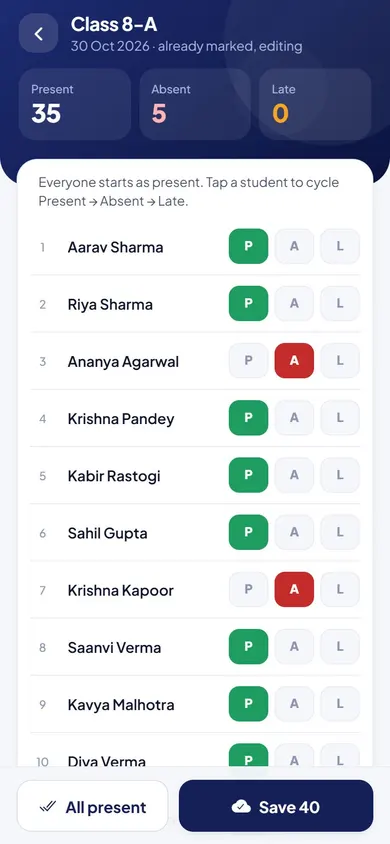
  • EduMaxim attendance app for teachers, Teacher screen: Mark P, A or L, or the whole class present in one tap
    TeacherMark P, A or L, or the whole class present in one tap
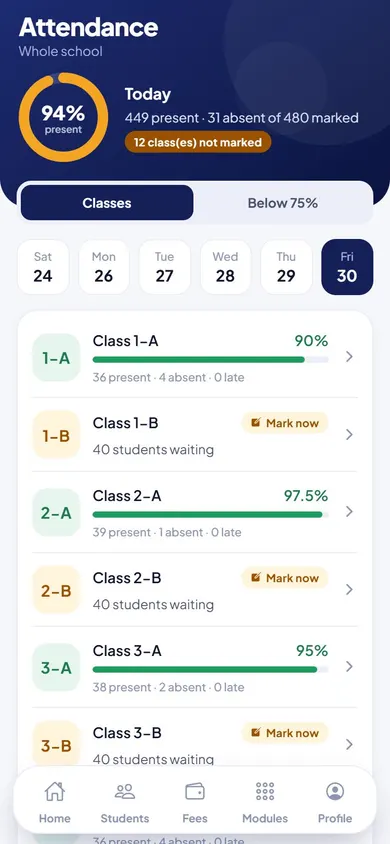
  • EduMaxim attendance app for teachers, Director screen: Class-wise attendance for today, and classes not yet marked
    DirectorClass-wise attendance for today, and classes not yet marked
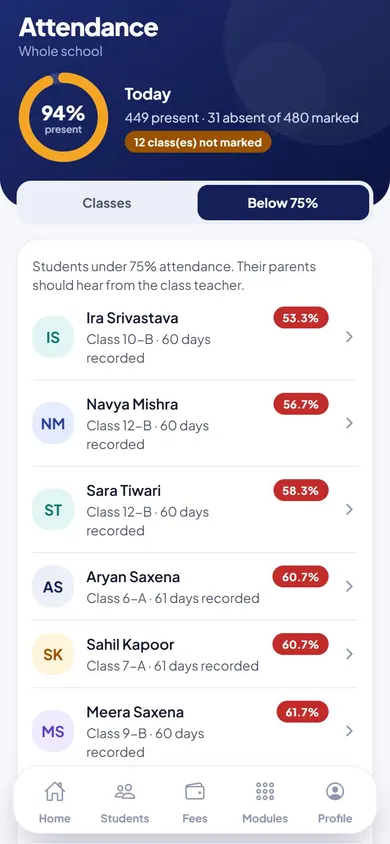
  • EduMaxim attendance app for teachers, Director screen: Students below 75% attendance, flagged automatically
    DirectorStudents below 75% attendance, flagged automatically

Everything included

Attendance app features for teachers

Schools also search for this as attendance software or an online attendance system.

  • Mark present, absent or late for each student
  • “All present” in a single tap
  • Attendance by subject and date
  • Automatic absence messages to parents
  • Class-wise attendance percentages
  • Each student sees their own attendance

In developmentStaff attendance & school payroll software: Teachers check in from their phone, leave is applied for and approved in the app, and a salary slip is made for every staff member each month.

Launching soonWhatsApp messages to parents: Absence alerts, fee reminders and results on WhatsApp, the app every parent already opens, alongside SMS and the parent app.

Buying guide

What to look for in a student attendance management system

Comparing options? These five things decide whether your staff still use it after the first month. Here is how EduMaxim handles each one.

  1. Fast enough for every class

    “All present” in one tap, then change only the few who are absent or late.

  2. Parents told the same morning

    An absence message goes to both parents automatically once attendance is saved.

  3. No machines to buy

    Teachers mark attendance on their own phone. No biometric devices or cards needed.

  4. Subject-wise when you need it

    Attendance is saved by subject and date, with class-wise percentages worked out for you.

  5. Early warning at 75%

    Students below 75% attendance are flagged on the principal’s dashboard.

Who it helps

Made for everyone who uses it

  • Teachers

    Mark attendance on their phone in seconds, subject by subject.

  • Director

    Sees attendance by class, and every child below 75%.

  • Parents & students

    See attendance in the app, and hear about an absence the same morning.

Guides

Read more about student attendance app

Questions about Attendance

How long does it take to mark attendance?

A few seconds per class. One tap marks everyone present, then the teacher changes only the students who are absent or late.

Are parents told when their child is absent?

Yes. An absence message goes to both parents automatically once attendance is saved.

Can we take attendance subject by subject?

Yes. Attendance is saved by subject and date, and class-wise percentages are worked out for you.

Is it an attendance app for school teachers?

Yes. Teachers mark attendance on their own phone, so the student attendance management system works without any machine or register.

How is attendance percentage calculated?

EduMaxim works it out from the attendance saved by subject and date, class by class, so nobody totals a register by hand. Students below 75% are flagged on the director’s dashboard.

Do we need biometric machines?

No. Teachers mark attendance on their own phone, so there is no biometric machine or card reader to buy.

Book a free demo