School Timetable Management Software

School timetable software: no clashes, a to-do for every teacher

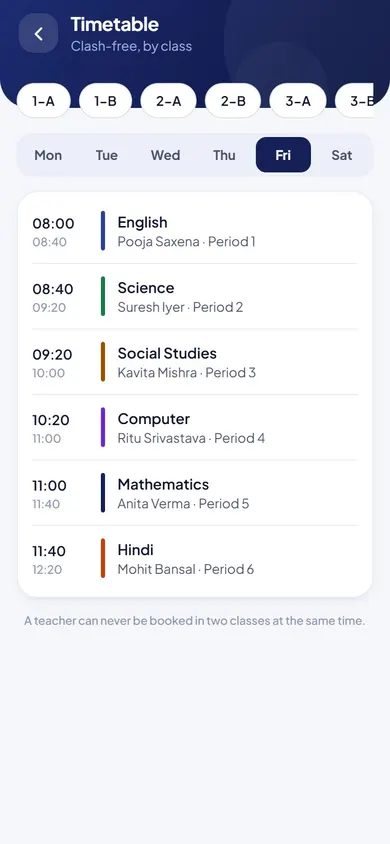
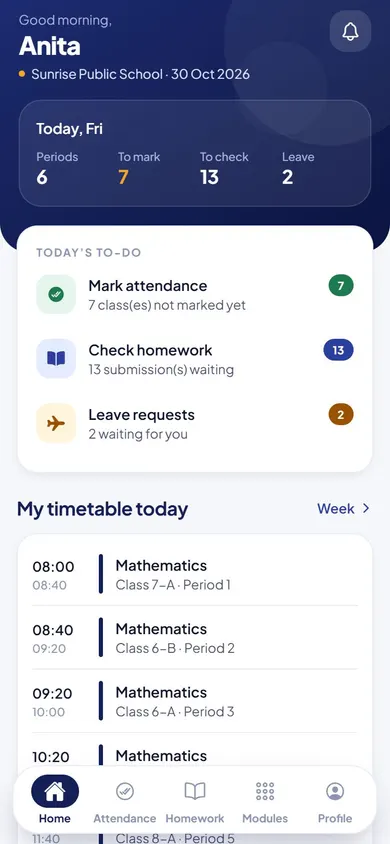
Teachers claim free periods for their own subject, and slots taken by others are locked, so clashes can’t happen. Every morning, the action centre shows what still needs doing.

A clash-free timetable, and a clear to-do list for every teacher.

  • Mon–Sattimetable for every class
  • 0double-booked periods
  • Dailyto-do list for each teacher
Timetable & Action Centre in the EduMaxim app: Each teacher’s to-do list, worked out for them. Sample data.

Sound familiar?

A timetable clash shouldn’t be found in the classroom

The timetable is built on paper over a weekend. On Monday, two teachers walk into the same class, and another period has nobody at all. Meanwhile, attendance that was never marked and leave requests nobody answered sit unnoticed for days.

What it quietly costs your school

  • Clashes found by students, not by the office
  • Missed attendance noticed days later
  • Leave requests left waiting

Timetable software that blocks clashes, and gives every teacher a clear to-do list each day.

Why schools use it

What Timetable & Action Centre does for your school

  • Built without clashes

    Teachers claim free slots for their subject, and a slot that is taken is locked.

  • Today’s work, listed

    The action centre shows each teacher what needs them today: attendance, homework to review and leave requests.

  • In every student’s app

    Students see the week’s timetable on their phone.

Before and after

What changes

Before

How it usually goes

  • Timetables built on paper with clashes found later
  • Missed attendance noticed days afterwards
  • Leave requests sitting unanswered
With EduMaxim

How it goes now

  • Periods claimed by subject, clashes blocked
  • Missing attendance for today shown class by class
  • Pending leave requests and submissions in one list

Three steps

How school timetable management works

  1. Step 1 of 3

    Teachers claim free slots

    Each teacher claims open periods for their own subject.

  2. Step 2 of 3

    Clashes are blocked

    A slot already taken by another teacher is locked.

  3. Step 3 of 3

    Everyone sees today

    Students see the timetable in their app, and teachers get today’s to-do list.

See it in the app

Timetable & Action Centre on your phone

Real screens from the EduMaxim app, shown with a sample school. Your school sees its own classes, students and fees.

  • EduMaxim school timetable software, Director screen: A clash-free timetable for every class
    DirectorA clash-free timetable for every class
  • EduMaxim school timetable software, Teacher screen: Each teacher’s day: to-dos, and today’s timetable
    TeacherEach teacher’s day: to-dos, and today’s timetable

Everything included

Class schedule and teacher timetable features

Schools also call this a timetable management system or class schedule software. It is not an automatic timetable generator.

  • Weekly timetable for every class, Monday to Saturday
  • Teachers claim free slots for their subject
  • Slots taken by other teachers are locked
  • Teacher action centre with today’s tasks
  • Timetable in every student’s app

Buying guide

What to look for in timetable software for school

Comparing options? These five things decide whether your staff still use it after the first month. Here is how EduMaxim handles each one.

  1. Clash-free by design

    Teachers claim free periods for their subject, and taken slots are locked for everyone else.

  2. The full week

    A weekly timetable for every class, Monday to Saturday.

  3. A daily to-do for teachers

    The action centre shows attendance still to mark, homework to review and leave requests waiting.

  4. Students always know

    The timetable is in every student’s app.

  5. Honest about what it is

    It isn’t an automatic timetable generator: teachers build it together, and it stays clash-free.

Who it helps

Made for everyone who uses it

  • Teachers

    Claim free periods and see today’s to-do list.

  • Director

    A timetable with no double-booked periods.

  • Students

    The week’s timetable in their app.

Guides

Read more about school timetable software

Questions about Timetable & Action Centre

Can two teachers get the same period?

No. Once a teacher takes a slot, it is locked for everyone else.

What is the teacher action centre?

A daily to-do list worked out from real records: attendance still to mark, homework to review and leave requests waiting.

Is it a school timetable generator?

Not an automatic one. It is timetable software for school where teachers claim free periods for their subject and taken slots lock, so the timetable stays clash-free.

Can students see the timetable?

Yes. The weekly timetable for their class is in every student’s app.

Can each teacher see their own timetable?

Yes. Each teacher’s home screen shows today’s periods along with attendance still to mark, homework to check and leave requests waiting.

Book a free demo