School Library Management Software

School library software: every book issued, tracked and returned

Know which books you have, how many are left and who has them. Students see the books issued to them in their own app.

Every book issued, tracked and back on the shelf.

  • 14 daysdue date, set automatically
  • Copies leftshown for every title
  • In the appstudents see their books
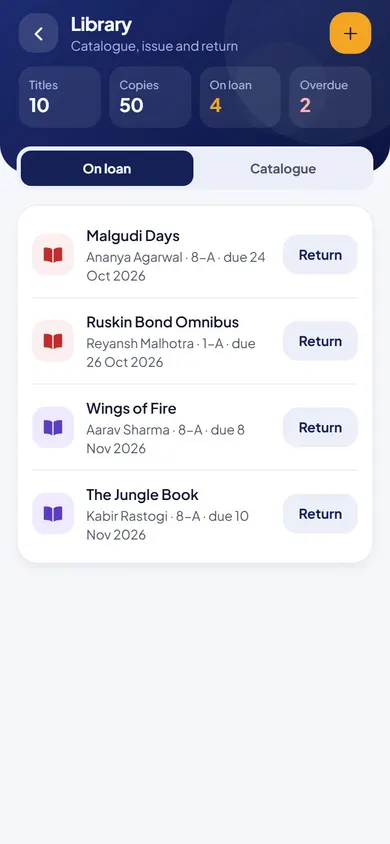
Library in the EduMaxim app: Every loan, with its due date. Sample data.

Sound familiar?

Nobody should need to decode the library register

The issue register is full of handwriting nobody can read. A book went out in July and nobody noticed it never came back. A student asks for a title and the librarian has to walk the shelves to find out if there’s a copy left.

What it quietly costs your school

  • Books lost because late returns go unnoticed
  • Time wasted checking shelves for copies
  • Students who don’t know what they have borrowed
School library software knows every book, every copy and who has it.

Why schools use it

What Library does for your school

  • A catalogue that knows its stock

    Every title shows how many copies are in stock.

  • Due dates set for you

    Each issue gets a 14-day due date automatically.

  • Every loan in one list

    See every book on loan, and students see the books they have.

Before and after

What changes

Before

How it usually goes

  • Issue registers that nobody can read
  • Late returns noticed months later
  • No idea how many copies are left
With EduMaxim

How it goes now

  • Every book issued against a student
  • A 14-day due date set automatically
  • Copies left shown for every title

Three steps

How the book issue and return software works

  1. Step 1 of 3

    Add your books

    Build the catalogue with the number of copies of each title.

  2. Step 2 of 3

    Issue to a student

    Each issue gets a 14-day due date automatically.

  3. Step 3 of 3

    Track every loan

    See every book on loan, and students see the books they have.

See it in the app

Library on your phone

Real screens from the EduMaxim app, shown with a sample school. Your school sees its own classes, students and fees.

  • EduMaxim library management system for school, Librarian screen: Books on loan, due dates and returns
    LibrarianBooks on loan, due dates and returns

Everything included

Library catalogue software features

Schools also call this a library management system or book issue and return software.

  • Book catalogue with copies in stock
  • Issue a book to a student for 14 days
  • List of books currently on loan
  • Students see the books they have

Buying guide

What to look for in school library management software

Comparing options? These five things decide whether your staff still use it after the first month. Here is how EduMaxim handles each one.

  1. A clear catalogue

    Every title with the number of copies in stock.

  2. Issue in seconds

    Issue a book to a student, with a 14-day due date set automatically.

  3. Know what’s out

    A list of every book currently on loan, and with whom.

  4. Students stay on top of it

    Each student sees the books issued to them in their own app.

  5. Part of your school ERP

    Uses the same student list as attendance and fees. Nothing typed twice.

Who it helps

Made for everyone who uses it

  • Librarian

    Issues and returns books, with due dates set automatically.

  • Director

    Sees stock and every book on loan.

  • Students

    See the books they have and when they are due.

Guides

Read more about school library software

Questions about Library

How long is a book issued for?

Fourteen days. The due date is set automatically when the book is issued.

Can students see which books they have?

Yes. Each student sees their borrowed books in the app.

Is this a library management system for school?

Yes. It keeps every book in stock, issues and returns books with due dates, and shows who has each book.

How do we track overdue books?

Every book on loan is listed with its due date, and overdue books also show on the director’s dashboard.

Can we see how many copies of a book are left?

Yes. The catalogue shows the number of copies in stock for every title.

Book a free demo