Student Leave & Transfer Certificate (TC) Software

Leave & transfer certificate (TC) software: done in the app

Leave applications reach the class teacher straight away and are approved or rejected in a tap. When a student leaves, the teacher issues the TC and the student prints it from their own app.

Leave and TCs, done in the app, not on paper.

  • 1 tapto approve or reject leave
  • Instantdecision in the student app
  • OnlineTCs issued and printed
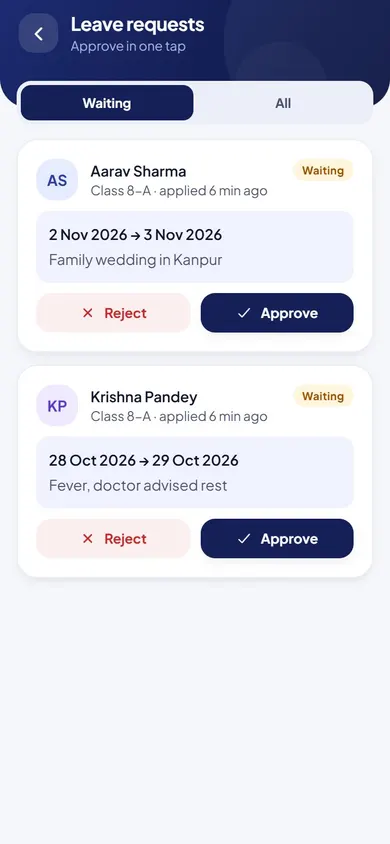
Leave & Transfer Certificates in the EduMaxim app: Leave decided in one tap. Sample data.

Sound familiar?

A leave note shouldn’t get lost, and a TC shouldn’t take a week

Leave applications arrive on loose paper, and parents never hear whether they were approved. When a student leaves, the office writes the transfer certificate by hand, one at a time, while the family waits.

What it quietly costs your school

  • Parents unsure whether leave was approved
  • No history of a student’s leave when you need it
  • Families waiting days for a handwritten TC
Leave and transfer certificate software makes both a few taps in the app.

Why schools use it

What Leave & Transfer Certificates does for your school

  • Leave without letters

    Students and parents apply for leave in the app.

  • Decided in one tap

    The teacher approves or rejects, the student sees it at once, and the history is kept.

  • TCs without handwriting

    Transfer certificates with reason and conduct are issued online and printed.

Before and after

What changes

Before

How it usually goes

  • Leave notes on loose paper
  • Parents unsure if leave was approved
  • TCs written by hand, one at a time
With EduMaxim

How it goes now

  • Leave applied for and approved in the app
  • Students see the decision as soon as it is made
  • TCs issued online and printed by the student

Three steps

How online leave applications and TCs work

  1. Step 1 of 3

    Apply in the app

    Students and parents apply for leave from the student app.

  2. Step 2 of 3

    Approve in one tap

    The teacher approves or rejects, and the student sees the decision at once.

  3. Step 3 of 3

    Issue the TC online

    Transfer certificates with reason and conduct are issued online and printed.

See it in the app

Leave & Transfer Certificates on your phone

Real screens from the EduMaxim app, shown with a sample school. Your school sees its own classes, students and fees.

  • EduMaxim leave and TC software, Teacher screen: Leave requests approved or rejected in one tap
    TeacherLeave requests approved or rejected in one tap

Everything included

Transfer certificate software features

Schools also search for this as a school leaving certificate system or online leave application software.

  • Leave applications from the student app
  • Approve or reject in one tap
  • Leave history for every student
  • Transfer certificates with reason and conduct
  • Students view and print their TC

Buying guide

What to look for in transfer certificate software

Comparing options? These five things decide whether your staff still use it after the first month. Here is how EduMaxim handles each one.

  1. Leave applied online

    Leave is applied for in the student app, so parents can see it too.

  2. Approved in one tap

    The teacher approves or rejects, and the student sees the decision at once.

  3. A full leave history

    Every student’s leave record in one place.

  4. TCs issued online

    Transfer certificates with the reason for leaving and conduct, issued from student records.

  5. Printed by the family

    Students view and print their TC from their own app.

Who it helps

Made for everyone who uses it

  • Teachers

    Approve or reject leave in one tap, and issue transfer certificates.

  • Students & parents

    Apply for leave, see the decision at once, and print their TC.

Guides

Read more about leave & transfer certificate (tc) software

Questions about Leave & Transfer Certificates

Can parents apply for leave online?

Yes. Leave is applied for in the student app, and the teacher approves or rejects it in one tap.

Can we print transfer certificates?

Yes. TCs with reason and conduct are issued online, and the student can view and print them.

What is on the school leaving certificate?

The TC format includes the student’s details, the reason for leaving and their conduct. It is transfer certificate software, so there is no handwritten copy to make.

Is there a record of each student’s leave?

Yes. Every student has a leave history, with each request and whether it was approved.

How long does it take to issue a TC?

Minutes. The teacher issues the TC online from the student’s record, with the reason for leaving and conduct, and the student can view and print it straight away.

Book a free demo