School Management Dashboard & MIS Reports

Director Dashboard: school MIS reports on one screen

Know how your school is doing without walking to the office. Students, staff, attendance and fee collection on one screen, with the children who need attention flagged before anyone has to ask.

Know how your school is doing before you reach the office.

  • 1 screenfor students, staff, attendance and fees
  • 75%attendance line: below it, a child is flagged
  • Every actionsaved in the audit log
Director Dashboard in the EduMaxim app: Students below 75% flagged for you. Sample data.

Sound familiar?

Running a school shouldn’t mean waiting for numbers

It’s Monday morning. You want to know how many students came in, how much fee came in last week, and which class keeps slipping. So you ask the office, and wait. By the time the register totals and the fee book reach your desk, the week has moved on and the numbers are already old.

What it quietly costs your school

  • Decisions made on last month’s numbers, not today’s
  • A child’s falling attendance noticed only when exams arrive
  • No way to tell who changed a mark or a fee, or when
A principal dashboard puts the whole school on one screen, live, wherever you are.

Why schools use it

What Director Dashboard does for your school

  • The numbers come to you

    Attendance and fee collection update as they are entered, so you never wait for the office to add them up.

  • Warnings before problems grow

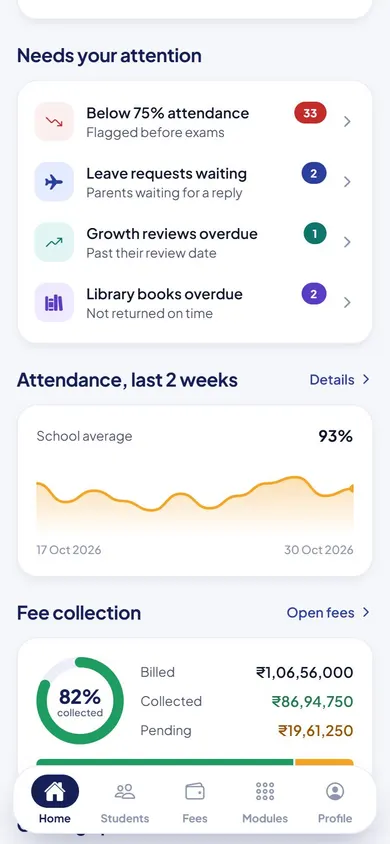
    Students below 75% attendance are listed automatically, long before exam time.

  • Everything on record

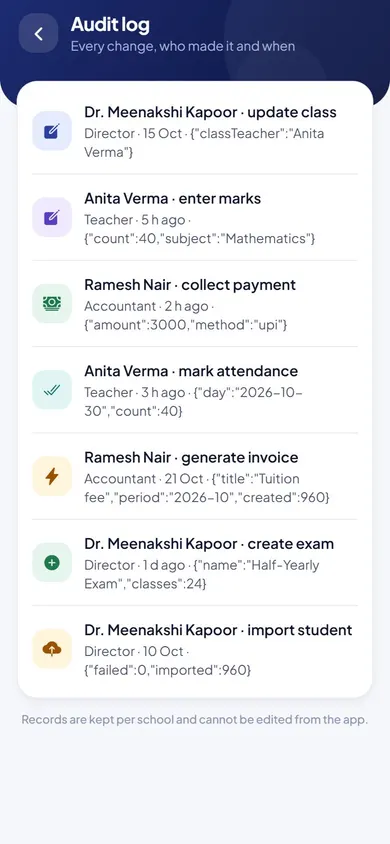
    Every action is saved with the person and the time, and any list goes out to Excel in a click.

Before and after

What changes

Before

How it usually goes

  • Waiting for the office to compile numbers
  • Falling attendance noticed only at exam time
  • No record of who changed what
With EduMaxim

How it goes now

  • Attendance and fee collection updated as they happen
  • Students below 75% attendance flagged automatically
  • An audit log of who did what, and when

Three steps

How the school analytics dashboard works

  1. Step 1 of 3

    Open the dashboard

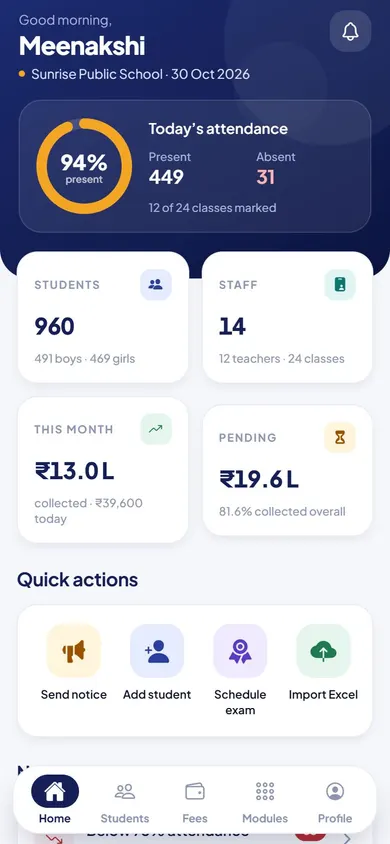
    Students, staff, today’s attendance and fee collection appear on one screen, on any phone or computer.

  2. Step 2 of 3

    See the warnings first

    Students below 75% attendance are listed automatically, before anyone has to ask.

  3. Step 3 of 3

    Act or export

    Promote classes at year end, check the audit log, or export records to Excel in a click.

See it in the app

Director Dashboard on your phone

Real screens from the EduMaxim app, shown with a sample school. Your school sees its own classes, students and fees.

  • EduMaxim principal dashboard, Director screen: Today’s attendance, students, staff and fees, the moment the app opens
    DirectorToday’s attendance, students, staff and fees, the moment the app opens
  • EduMaxim principal dashboard, Director screen: What needs attention: students below 75%, leave requests and overdue reviews
    DirectorWhat needs attention: students below 75%, leave requests and overdue reviews
  • EduMaxim principal dashboard, Director screen: The audit log: who changed what, and when
    DirectorThe audit log: who changed what, and when

Everything included

School MIS software features

Schools also call this a principal dashboard, school MIS software or school analytics.

  • Students, teachers, attendance and fees collected on one screen
  • Class-wise attendance
  • Automatic list of students below 75% attendance
  • Promote a whole class to the next one at year end
  • Export students, marks, fees and attendance to Excel (CSV)
  • Audit log of every action

In developmentStaff attendance & school payroll software: Teachers check in from their phone, leave is applied for and approved in the app, and a salary slip is made for every staff member each month.

Buying guide

What to look for in a school management dashboard

Comparing options? These five things decide whether your staff still use it after the first month. Here is how EduMaxim handles each one.

  1. Live numbers, not end-of-month reports

    Students, teachers, attendance and fee collection update as they happen.

  2. Early warnings, not late surprises

    Students below 75% attendance are listed automatically, while there is still time to act.

  3. Open it from anywhere

    Runs in the browser on any phone, tablet or computer, so you can check the school from home.

  4. A record you can trust

    An audit log keeps every action with the person’s name and the time.

  5. Your data stays yours

    Export students, marks, fees and attendance to Excel whenever you need them.

Who it helps

Made for everyone who uses it

  • Director & owner

    The whole school on one screen, from home or on the move.

  • Principal

    Early warnings on attendance, and whole classes promoted at year end.

Guides

Read more about director dashboard

Questions about Director Dashboard

Can the owner check the school from home?

Yes. The dashboard opens in the browser on any phone, tablet or computer, so the owner or principal can see attendance and fee collection from anywhere.

Can we export our school data to Excel?

Yes. Students, marks, fees and attendance export to CSV files that open in Excel, whenever you need them.

Is there a record of who changed what?

Yes. Every action is saved in an audit log with the person’s name and the time.

Is this a principal dashboard with MIS reports?

Yes. It is the principal dashboard for the whole school: MIS reports on students, staff, attendance and fee collection, with students below 75% attendance flagged.

What reports should a principal check every day?

Students present today, classes not yet marked, students below 75% attendance, fees collected and pending, leave requests waiting and recent changes in the audit log. The dashboard shows these on one screen.

Can we promote a whole class at the end of the year?

Yes. The director can promote a whole class to the next one in one step at year end.

Book a free demo