School SMS Software & Parent Communication App

School SMS & parent app: reach every parent in one go

Both parents get every automatic message: absence, fees and results. Send your own message to one class or the whole school, and post announcements everyone sees in their app.

Every parent reached, and every message on record.

  • 2parents reached by every message
  • 3automatic alerts: absence, fees, results
  • Every messagekept in a log
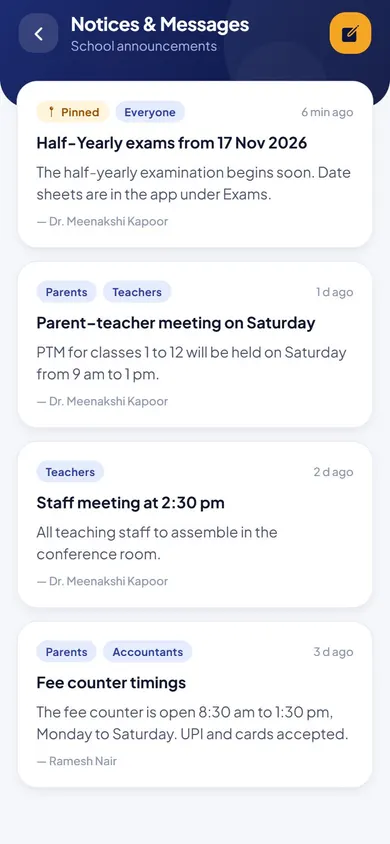
Messages & Announcements in the EduMaxim app: Every message, on record. Sample data.

Sound familiar?

Important notices shouldn’t get lost in a school bag

A circular goes home on paper and never reaches the parent. A message goes into a WhatsApp group and is buried under fifty others by evening. When a parent says “nobody told us”, there’s no record to show that you did.

What it quietly costs your school

  • Parents missing fee dates, meetings and holidays
  • Hours spent forwarding the same message to different groups
  • No proof of what was sent, or when

School SMS software and a parent app reach every family, and keep a record of every message.

Why schools use it

What Messages & Announcements does for your school

  • One message, the whole school

    Send to one class, or to every parent in the school, in one go.

  • Alerts that send themselves

    Absence, fee and result messages go out automatically.

  • Proof of what was said

    A log of every message, so you can always show what parents were told, and when.

Before and after

What changes

Before

How it usually goes

  • Circulars lost in school bags
  • Important notices buried in busy WhatsApp groups
  • No record of what was sent to whom
With EduMaxim

How it goes now

  • Messages to a class or the whole school
  • Announcements in every student’s and teacher’s app
  • A log of every message sent

Three steps

How the school notice app works

  1. Step 1 of 3

    Choose who to reach

    One class or the whole school.

  2. Step 2 of 3

    Send in one go

    The message goes to both parents of every student.

  3. Step 3 of 3

    Everything is on record

    Absence, fee and result messages go automatically, and every message is logged.

See it in the app

Messages & Announcements on your phone

Real screens from the EduMaxim app, shown with a sample school. Your school sees its own classes, students and fees.

  • EduMaxim school SMS and notice app, Office screen: Notices for the whole school, a class, teachers or parents
    OfficeNotices for the whole school, a class, teachers or parents

Everything included

Bulk SMS and parent communication features

Schools also call this a school communication app, a school notice app or bulk SMS software.

  • SMS to parents by class or the whole school
  • Automatic messages for absence, fees and results
  • Messages go to both parents
  • School-wide announcements
  • Message log

Launching soonWhatsApp messages to parents: Absence alerts, fee reminders and results on WhatsApp, the app every parent already opens, alongside SMS and the parent app.

Buying guide

What to look for in school SMS software and a parent app

Comparing options? These five things decide whether your staff still use it after the first month. Here is how EduMaxim handles each one.

  1. Reach exactly who you need

    SMS to the whole school, one class or one family.

  2. Both parents, every time

    Every message goes to both parents’ numbers on the student’s record.

  3. The routine goes out by itself

    Absence, fee and result messages are sent automatically.

  4. Circulars in the app

    School-wide announcements appear in every student’s and teacher’s app.

  5. A record of everything

    A log of every message, so you can always show what parents were told.

Who it helps

Made for everyone who uses it

  • Director

    Messages and announcements for the whole school.

  • Teachers

    Reach the parents of their class in one go.

  • Parents

    Every update on their phone, sent to both parents.

Guides

Read more about school sms & parent app

Questions about Messages & Announcements

Do messages go to both parents?

Yes. Every message goes to both parents’ numbers on the student’s record.

Which messages are sent automatically?

Absence alerts, fee reminders and results. Announcements and class messages go when you send them.

Is there a record of what was sent?

Yes. Every message is kept in a log, so you can always show what parents were told and when.

Can we send bulk SMS and school circulars?

Yes. Send bulk SMS to the whole school or one class, and post school circulars as announcements every parent sees in the app.

How do we send an SMS to all parents?

Choose the whole school, one class or one family, write the message and send. Every message is kept in a log.

Can we send notices to teachers only?

Yes. Announcements can go to everyone, or only to parents, teachers or accountants, and appear in their app.

Book a free demo