School Bus Tracking App & Transport Management

School bus tracking app: every bus live, every child confirmed

Parents worry most between home and school. The bus phone shares its location, parents see it on the map, and the attendant confirms when each child gets on and off.

Every bus live. Every child confirmed.

  • ~10 secbetween location updates
  • No GPS devicethe driver’s phone is enough
  • Every childboarding and drop-off marked
Transport & Live Bus Tracking in the EduMaxim app: The bus, live, and Riya on board. Sample data.

Sound familiar?

“Where is the bus?” shouldn’t be the office’s most common call

Every morning and every afternoon, the phone rings: the bus is late, where is it, has my child got off? The transport in-charge calls the driver, the driver calls back, and nobody can say for sure that a child got off at the right stop.

What it quietly costs your school

  • Office phones tied up twice a day
  • Anxious parents, and no proof of drop-off
  • Route lists kept in a notebook that only one person understands
A school bus tracking app shows the bus live, and confirms every child on and off.

Why schools use it

What Transport & Live Bus Tracking does for your school

  • Parents stop calling the office

    Parents see where the bus is in the app, so the office phone stays quiet.

  • Every child accounted for

    Boarding and drop-off are marked for each child on the trip.

  • No hardware to buy

    A secure link on the driver’s phone shares GPS for that trip only.

Before and after

What changes

Before

How it usually goes

  • Phone calls from parents asking where the bus is
  • Route lists kept in a notebook
  • No proof a child actually got off at their stop
With EduMaxim

How it goes now

  • Live bus location, updated every 10 seconds
  • Routes, stops and students managed on one screen
  • Boarding and drop-off confirmed for every child

Three steps

How the school bus tracking app works

  1. Step 1 of 3

    Set routes and stops

    Add routes, stops, vehicles and drivers, and give each student a stop.

  2. Step 2 of 3

    The driver starts the trip

    The driver opens a secure trip link on the bus phone, which shares its GPS.

  3. Step 3 of 3

    Parents track the bus

    Parents see the bus live, and each child’s boarding and drop-off is marked.

See it in the app

Transport & Live Bus Tracking on your phone

Real screens from the EduMaxim app, shown with a sample school. Your school sees its own classes, students and fees.

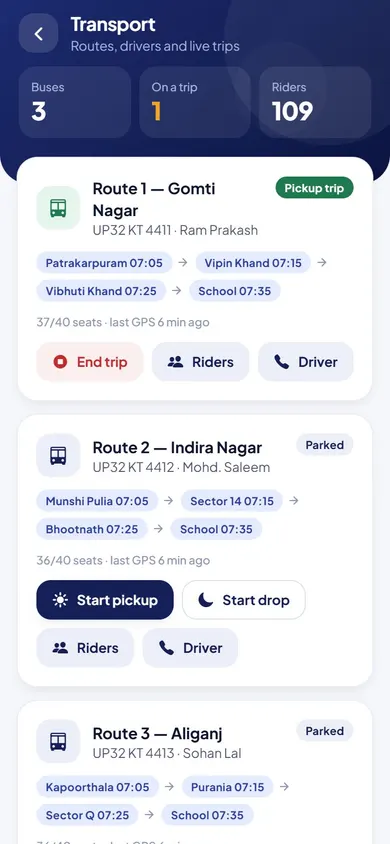
  • EduMaxim school bus tracking app, Transport in-charge screen: Routes, stops and live trips, with who has boarded
    Transport in-chargeRoutes, stops and live trips, with who has boarded

Everything included

Bus route management and pickup and drop status

Schools also call this school transport management software or GPS school bus tracking.

  • Routes with stops, vehicles and drivers
  • Driver link that shares GPS from the bus phone
  • Start pickup and drop-off trips
  • Passenger list with boarding and drop-off status
  • Students assigned to a route and stop
  • Track my bus in the student app

Buying guide

What to look for in a school bus tracking app

Comparing options? These five things decide whether your staff still use it after the first month. Here is how EduMaxim handles each one.

  1. No GPS device to buy

    The driver’s phone shares the bus location through a secure link that works only for that trip.

  2. Live and honest

    The location updates about every 10 seconds, and the app says so when the signal is weak or old.

  3. Every child confirmed

    Boarding and drop-off are marked for every child, and parents see it.

  4. Routes in one place

    Routes, stops, vehicles, drivers and students managed on one screen.

  5. In the parent’s pocket

    “Track my bus” is in the student app.

Who it helps

Made for everyone who uses it

  • Director

    Sets routes, stops, vehicles and drivers, and gives each child a stop.

  • Drivers

    Start the trip and share the location from their own phone.

  • Parents & students

    Track the bus and see when the child boards and gets off.

Guides

Read more about school bus tracking app

Questions about Transport & Live Bus Tracking

Do we need to fit GPS devices in our buses?

No. The driver’s phone shares the location through a secure link that works only for that trip.

How often does the bus location update?

About every 10 seconds during a trip. If the signal is weak or the last reading is old, the app says so instead of showing a wrong position.

Do parents know when their child gets off the bus?

Yes. Boarding and drop-off are marked for every child on the trip, and parents see the status in the app.

Is this school transport management software with GPS bus tracking?

Yes. It manages routes, stops and the students on every bus, and GPS bus tracking comes from the driver’s phone, with no device to fit.

How can parents track the school bus?

In the student app, “Track my bus” shows the bus live during each trip, and whether their child has boarded or got off.

Can we manage bus routes and stops?

Yes. Add routes with their stops, vehicles and drivers, and assign each student to a route and stop.

Book a free demo