School Fee Management Software & Fee Collection

School fee management: fees in on time, receipts made for you

Set the month’s fee for a class once and every student in it sees what is due in their app. When a fee is marked paid, the student’s app updates straight away.

Fees in on time, without a single follow-up call.

  • 1 tapreminds every parent who hasn’t paid
  • 0carbon receipt books
  • Always currentcollected, pending and billed totals
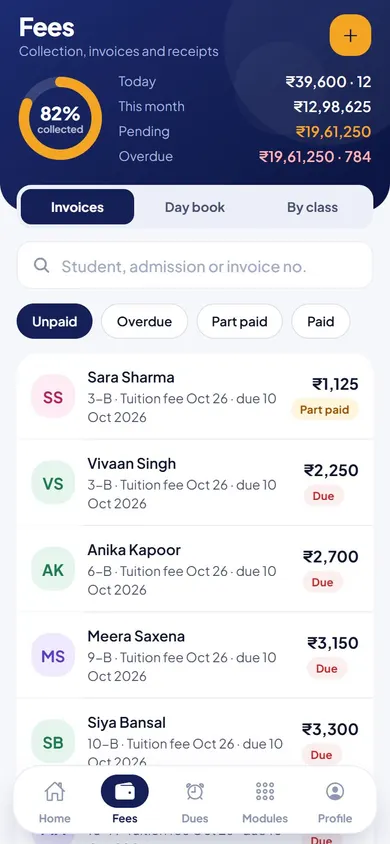
Fees & Invoices in the EduMaxim app: Remind every parent who hasn’t paid. Sample data.

Sound familiar?

Fee day shouldn’t mean a day of phone calls

The due date passes. The accountant makes a defaulter list by hand, the office starts calling parents one by one, and receipts are still being written in carbon books. Parents call back to ask what they owe for which month, and the whole cycle starts again next month.

What it quietly costs your school

  • Late fees that quietly squeeze the school’s cash flow
  • Office hours lost to reminder calls and handwritten receipts
  • Awkward conversations with parents over what was paid
School fee management software does the chasing and the paperwork, so fees come in on time.

Why schools use it

What Fees & Invoices does for your school

  • Set once for the whole class

    Add a month’s fee to every student in a class in one step.

  • Reminders without phone calls

    One tap reminds every parent whose fees are pending.

  • Receipts make themselves

    An invoice and a receipt are created for every payment, and parents see them in the app.

Before and after

What changes

Before

How it usually goes

  • Defaulter lists made by hand before every due date
  • Receipts written in carbon books
  • Parents unsure what they owe and for which month
With EduMaxim

How it goes now

  • Collected, pending and billed totals, always current
  • An invoice created automatically for every payment
  • A reminder to every unpaid parent in one tap

Three steps

How the fee collection software works

  1. Step 1 of 3

    Set the fee once

    Add a monthly fee to a whole class in one step.

  2. Step 2 of 3

    Remind who hasn’t paid

    One tap sends a reminder to every parent with fees pending.

  3. Step 3 of 3

    Receipts make themselves

    Mark a payment and the invoice and receipt are created, and class totals update.

See it in the app

Fees & Invoices on your phone

Real screens from the EduMaxim app, shown with a sample school. Your school sees its own classes, students and fees.

  • EduMaxim fee collection software, Accountant screen: Collected, pending and overdue fees, with every student’s status
    AccountantCollected, pending and overdue fees, with every student’s status
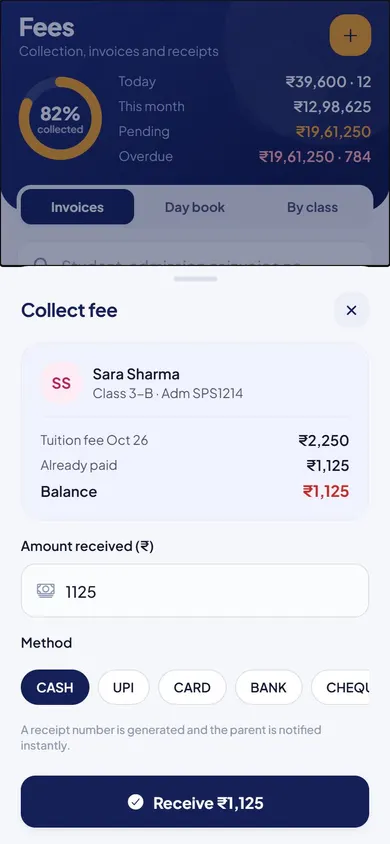
  • EduMaxim fee collection software, Accountant screen: Record a payment: cash, UPI, card, bank or cheque
    AccountantRecord a payment: cash, UPI, card, bank or cheque
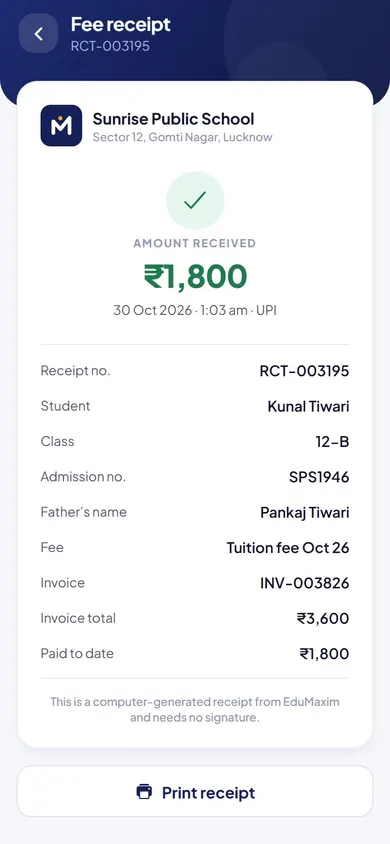
  • EduMaxim fee collection software, Parent & office screen: A receipt for every payment, ready to print
    Parent & officeA receipt for every payment, ready to print

Everything included

Fee receipt generator and billing features

Schools also call this a fee management system, school fee software or fee collection software.

  • Add a monthly fee to a whole class at once
  • Collect fees and mark them paid
  • Fee reminders to parents who haven’t paid
  • Invoices and receipts generated automatically
  • Collected, pending and billed totals by class
  • Fees due and payment history in the student app

Launching soonWhatsApp messages to parents: Absence alerts, fee reminders and results on WhatsApp, the app every parent already opens, alongside SMS and the parent app.

Buying guide

What to look for in school fee management software

Comparing options? These five things decide whether your staff still use it after the first month. Here is how EduMaxim handles each one.

  1. Set fees once

    Add the month’s fee to a whole class in one step, with a different amount for each class.

  2. Reminders without calls

    One tap reminds every parent who hasn’t paid.

  3. Receipts that make themselves

    Every payment gets an invoice and a receipt automatically.

  4. Always know where you stand

    Collected, pending and billed totals by class, always up to date.

  5. Parents see it all

    Fees due and every past payment appear in the parent’s app, so there are no disputes.

Who it helps

Made for everyone who uses it

  • Accountant

    Adds fees, records payments and sends reminders in minutes.

  • Director

    Sees collected and pending fees, class by class, at any time.

  • Parents

    See what is due and every receipt on their phone.

Guides

Read more about school fee management

Questions about Fees & Invoices

Can we see who hasn’t paid fees?

Yes. Collected, pending and billed totals by class are always up to date, and one tap reminds every parent who hasn’t paid.

Are fee receipts generated automatically?

Yes. Every payment gets an invoice and a receipt, and parents see fees due and payment history in the app.

Can each class have a different fee?

Yes. You add the monthly fee class by class, so each class can have its own amount.

Is this fee collection software for schools?

Yes. It records every fee collected, makes the fee receipt, and sends fee reminders to parents who have not paid.

How do we reduce fee defaulters?

Set the fee once for each class, remind every unpaid parent in one tap, and let parents see what they owe and every receipt in the app. Clear dues and quick reminders cut most defaulters without phone calls.

Can we record cash, UPI and cheque payments?

Yes. When a payment is received, the accountant records it with its method, such as cash, UPI, card, bank transfer or cheque, and a receipt is made.

Book a free demo