School Exam Management & Report Card Software

Exams & report card software: marks go in, report cards come out

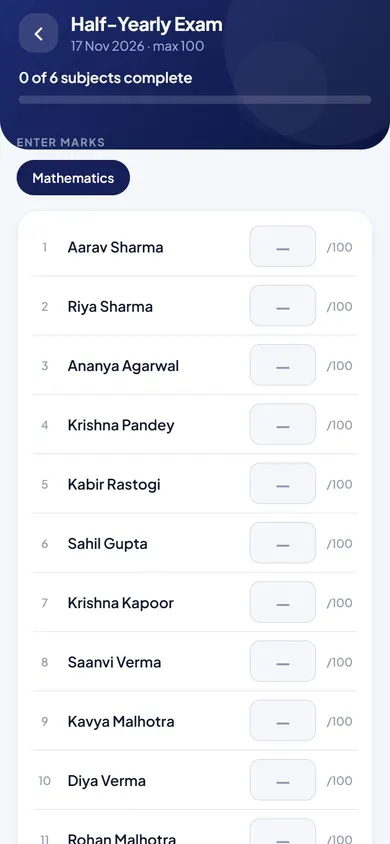
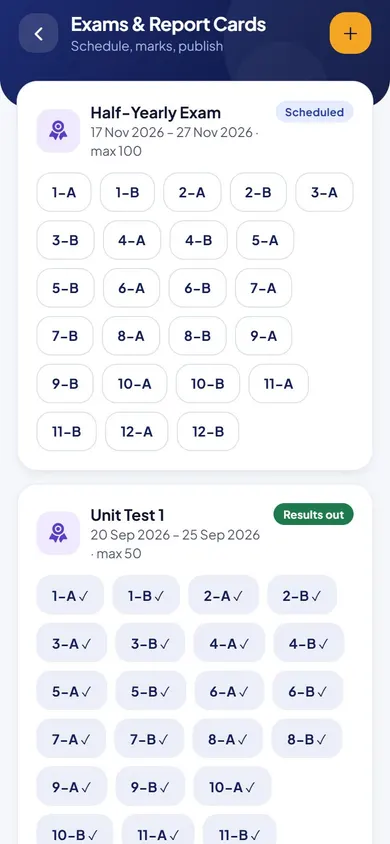
The director schedules an exam once and it becomes an announcement for teachers and students. Each teacher enters marks for their own subject, topic by topic.

Marks go in. Report cards come out. Weak topics show up.

  • Topic by topicscores, not just a total
  • Privateeach teacher sees only their subject
  • In the appreport cards for parents
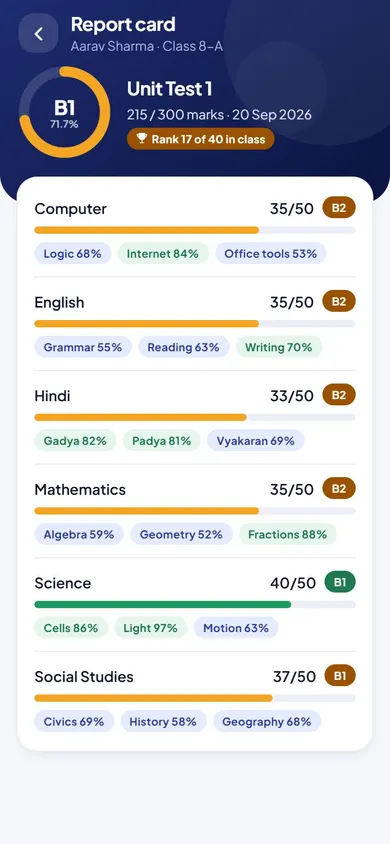
Exams, Marks & Report Cards in the EduMaxim app: Topic-wise scores show the real gap. Sample data.

Sound familiar?

Results week shouldn’t take a week

Exam dates go out on paper and half the class misses them. After the exam, the class teacher chases every subject teacher for marks, copies them into a sheet, totals them and writes report cards by hand. And a single total still doesn’t tell anyone where a child is actually weak.

What it quietly costs your school

  • Days of copying marks between registers and sheets
  • Mistakes that only show up when a parent complains
  • Report cards that say how much, but not what to work on
Report card software turns marks into report cards, and shows the weak topics behind them.

Why schools use it

What Exams, Marks & Report Cards does for your school

  • Exams announced for you

    Schedule an exam with class, dates and subjects, and everyone is told automatically.

  • Marks without the chasing

    Each subject teacher enters their own marks, privately. No sheets passed from desk to desk.

  • See exactly where a child is weak

    Topic-wise scores, such as Algebra and Geometry, show the real gap, not just a total.

Before and after

What changes

Before

How it usually goes

  • Exam dates passed around on paper
  • Marks collected from every subject teacher by hand
  • No clear picture of which topics a child finds hard
With EduMaxim

How it goes now

  • Scheduling an exam announces it to everyone
  • Marks entered by each subject teacher, privately
  • Scores by topic, so weak spots are obvious

Three steps

How the exam management system works

  1. Step 1 of 3

    Schedule the exam

    Pick the class, dates and subjects. Everyone is told automatically.

  2. Step 2 of 3

    Teachers enter marks

    Each subject teacher enters marks topic by topic, privately.

  3. Step 3 of 3

    Report cards appear

    Students and parents see the report card in the app, with topic-wise scores.

See it in the app

Exams, Marks & Report Cards on your phone

Real screens from the EduMaxim app, shown with a sample school. Your school sees its own classes, students and fees.

  • EduMaxim report card software, Director screen: Exams scheduled by class
    DirectorExams scheduled by class
  • EduMaxim report card software, Teacher screen: Each teacher enters marks for their own subject
    TeacherEach teacher enters marks for their own subject
  • EduMaxim report card software, Parent & director screen: The report card, with subject and topic-wise scores
    Parent & directorThe report card, with subject and topic-wise scores

Everything included

Marksheet and report card features

Schools also call this exam management software, a result management system or marksheet software.

  • Exam schedules by class, dates and subjects
  • Automatic announcement when an exam is scheduled
  • Marks entry by subject teacher
  • Teachers see only their own subject’s marks
  • Topic-wise scores, such as Algebra and Geometry
  • Report cards in the student app

In developmentPrintable report cards in CBSE-style formats: Report cards as print-ready PDFs with your school’s logo and signatures, in term-wise layouts like the ones CBSE schools use.

Buying guide

What to look for in report card software

Comparing options? These five things decide whether your staff still use it after the first month. Here is how EduMaxim handles each one.

  1. Exams announced automatically

    Schedule an exam once and teachers and students are told.

  2. Each teacher enters their own marks

    Subject teachers enter marks for their subject only, privately.

  3. Topic-wise scores

    Marks by topic, such as Algebra and Geometry, show exactly where a child is weak.

  4. Report cards without typing

    Report cards are made from the marks and appear in the student app.

  5. Results reach parents

    Results go to parents by SMS and in the app.

Who it helps

Made for everyone who uses it

  • Director

    Schedules exams and watches results come in.

  • Subject teachers

    Enter marks topic by topic, for their own subject only.

  • Parents & students

    See the report card and topic-wise scores in the app.

Guides

Read more about exams & report card software

Questions about Exams, Marks & Report Cards

Can teachers see each other’s marks?

No. Each teacher sees and enters only their own subject’s marks.

Why record marks topic by topic?

Topic-wise scores, such as Algebra and Geometry separately, show exactly where a child is weak, not just a total.

How do parents get the report card?

Report cards appear in the student app, so parents see them on their phone without a printed copy.

Does it work as a school exam management system and report card generator?

Yes. Exams are scheduled by class, marks go in subject by subject, and the report card, the marksheet parents see, is made from those marks.

How do we send exam results to parents?

Results reach parents by SMS and in the app, and report cards appear in the student app.

Do we need to print a report card for every parent?

No. Report cards appear in the student app, so every parent can see them on their phone.

Book a free demo