AI Homework Checking & Assignment Management

AI homework checking: AI suggests the score, teachers confirm

Set an assignment with a photo of the worksheet. Students photograph their answers. The AI reads each one, suggests a score and sets practice on weak topics, but it never marks a child on its own.

Homework checked faster, and practice that fits every child.

  • 1 phototo hand in homework
  • Teacherconfirms every AI score
  • Personalpractice for weak topics
Assignments & AI Checking in the EduMaxim app: The teacher confirms every score. Sample data.

Sound familiar?

Forty notebooks a night is not teaching

Every evening, a pile of notebooks. Every one checked by hand, marks noted, the same mistakes circled again and again. There’s never time to give each child practice on what they got wrong, so the same gaps turn up in the exam.

What it quietly costs your school

  • Teachers’ evenings lost to checking, not planning
  • Mistakes repeated because nobody had time to follow up
  • Students stuck at home with no one to ask
AI homework checking suggests the score and feedback. The teacher decides.

Why schools use it

What Assignments & AI Checking does for your school

  • Handed in with a photo

    Students photograph their notebook or worksheet. No piles of copies to carry home.

  • AI suggests, the teacher decides

    The AI suggests a score and feedback, and the teacher confirms or changes it.

  • Practice that fits each child

    Practice is created for each student’s weak topics, with an AI study buddy that explains step by step.

Before and after

What changes

Before

How it usually goes

  • Piles of notebooks to check every evening
  • The same mistakes repeated because nobody had time to follow up
  • Students stuck at home with no one to ask
With EduMaxim

How it goes now

  • A suggested score for every submission, ready to confirm
  • Practice tasks made for each student’s weak topics
  • A study buddy that explains concepts, not answers

Three steps

How AI homework checking works

  1. Step 1 of 3

    Set the assignment

    The teacher adds the assignment, with a worksheet photo if needed.

  2. Step 2 of 3

    Students hand in a photo

    Students photograph their work, and the AI suggests a score and feedback.

  3. Step 3 of 3

    The teacher confirms

    The teacher confirms or changes the score, and practice is set for weak topics.

See it in the app

Assignments & AI Checking on your phone

Real screens from the EduMaxim app, shown with a sample school. Your school sees its own classes, students and fees.

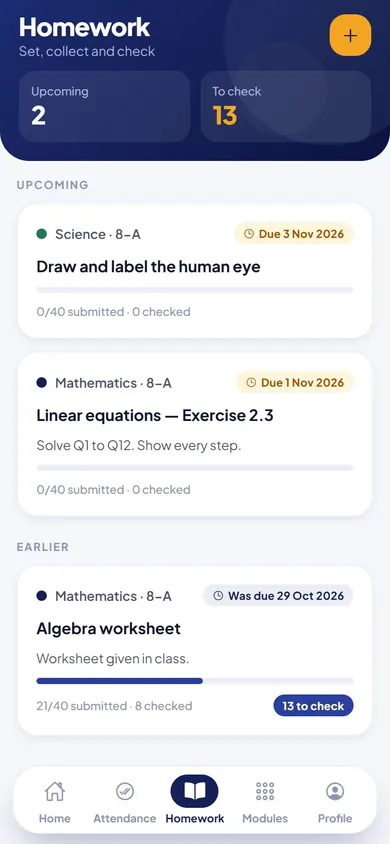
  • EduMaxim homework app for school, Teacher screen: Homework set for a class, with due dates
    TeacherHomework set for a class, with due dates
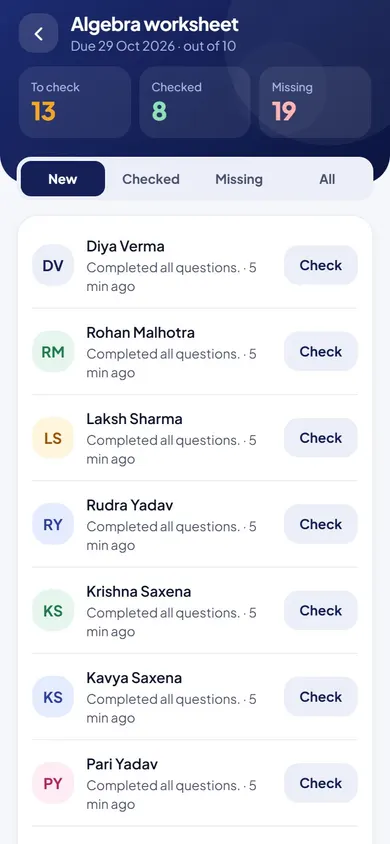
  • EduMaxim homework app for school, Teacher screen: Who has submitted, what is checked and what is missing
    TeacherWho has submitted, what is checked and what is missing

Everything included

Assignment management system features

Schools also search for this as homework management software, an online homework app or an assignment management system.

  • Assignments with an optional worksheet photo
  • Students submit by photographing their work
  • AI-suggested scores, confirmed by the teacher
  • Personal practice for weak topics
  • AI study buddy for students
  • Daily AI insight on each student’s progress

Buying guide

What to look for in AI homework checking

Comparing options? These five things decide whether your staff still use it after the first month. Here is how EduMaxim handles each one.

  1. The teacher always decides

    AI suggests a score and feedback; the teacher confirms or changes every mark.

  2. Honest about unclear work

    If a photo can’t be read, the AI says so instead of guessing.

  3. Easy for students

    Students submit by photographing their work. No typing needed.

  4. Practice for weak topics

    Each student gets practice tasks for the topics they got wrong.

  5. Help at home

    An AI study buddy explains concepts step by step, not just the answers.

Who it helps

Made for everyone who uses it

  • Teachers

    Review AI-suggested scores and confirm them, with the final say on every mark.

  • Students

    Hand in by photo, and get feedback and practice for their weak topics.

Guides

Read more about ai homework checking

Questions about Assignments & AI Checking

Does the AI give marks on its own?

No. The AI suggests a score and feedback, and the teacher confirms or changes it. The teacher always has the final say.

What if the photo is unclear?

The AI says the photo can’t be read instead of guessing, and the teacher marks that work by hand.

Does each student get practice?

Yes. Practice tasks are created for each student’s weak topics, and an AI study buddy explains step by step.

Is this a homework app for the whole class?

Yes. It is an assignment management system: teachers set homework, students submit photos, AI suggests a score and the teacher confirms it.

How do students submit homework online?

Students photograph their written work and submit it in the app. No typing is needed.

How does it help teachers check homework faster?

Each submission arrives with an AI-suggested score and feedback ready to confirm, and the teacher sees new, checked and missing work in separate lists.

Book a free demo